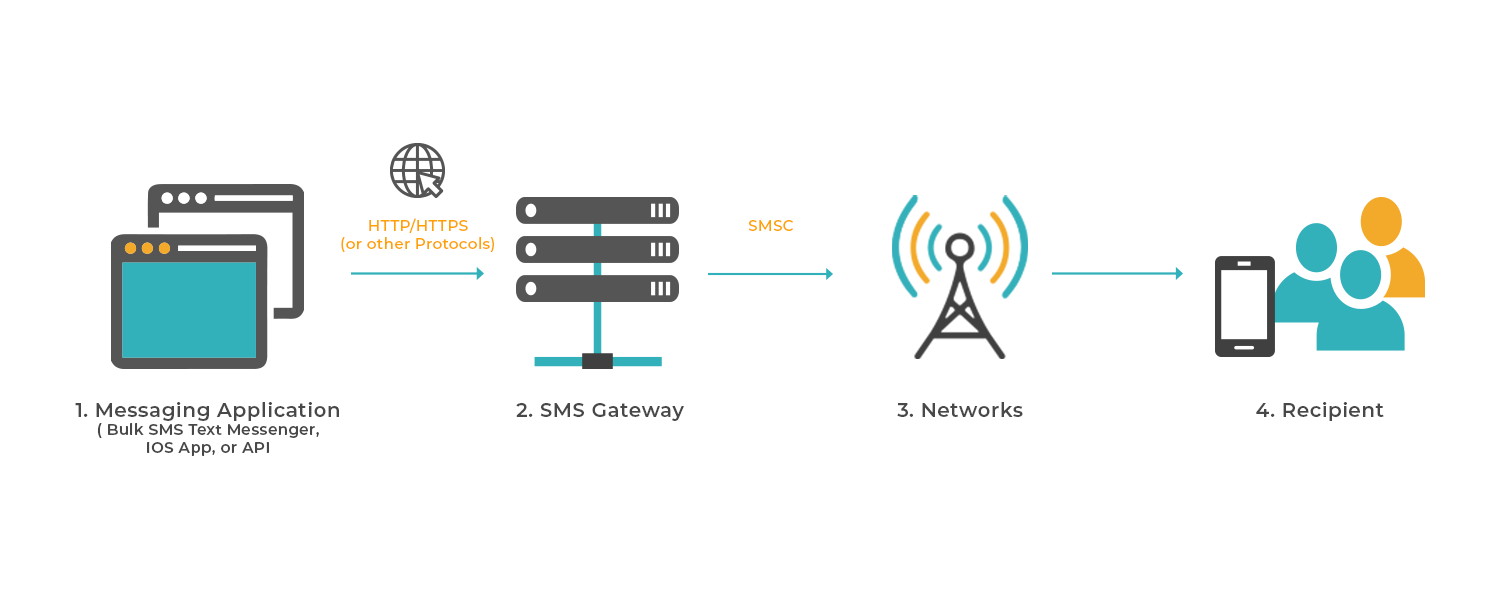
SMS API DOCUMENTATION

INTRODUCTION

SENDING SMS

Parameters

post
https://smsbox.devotek.africa/api/sms/v1/send_sms

headers

Field Type Description
api-key string

Basic Authentication Username

api-secret string

Basic Authentication Password

Content-Type string

application/json => This is used for json request
application/xml => This is used for xml request

body

Field Type Description
source_addr string

Message source address or sender ID. Limited to 11 characters if text. Or valid mobile number in valid international number format with country code. No leading + sign. Has to be active on the sms portal.

schedule_time optional string

Scheduled time of the message. GMT+0 timezone. Format (yyyy-mm-dd hh:mm). If empty, the message will be immediately deliveried

message string

Content/message.You can use [{RECEIVERNAME}] as recipient name variable which will be replaced by the recipient_name value

encoding number

message encoding type.Default value is 0

recipients string

Array of destination numbers

recipient_name string

Recipient name. Can be any string value upto X Characters.

dest_addr string

Destination mobile number in valid international number format with country code. With leading + sign. Example +22660000001

Sample request data

post
https://smsbox.devotek.africa/api/sms/v1/send_sms
{
    "source_addr": "YOUR APPROVED SENDER ID",
    "schedule_time": "",
    "encoding": "0",
    "message": "Hello [{RECEIVERNAME}]",
    "recipients": [
        {
            "recipient_name": "Alex",
            "dest_addr": "+22687161524"
        },
        {
            "recipient_name": "Thomas",
            "dest_addr": "+22671625142"
        }
    ]
}
<sms>
  <source_addr>INFO</source_addr>
  <schedule_time />
  <message>Hello world</message>
  <recipients>
      <recipient>
          <recipient_name>"Ibrahim"</recipient_name>
          <dest_addr>+22687161524</dest_addr>
      </recipient>
      <recipient>
          <recipient_name>"Jose"</recipient_name>
          <dest_addr>255600000002</dest_addr>
      </recipient>
  </recipients>
</sms>

Sample Scripts

post
https://smsbox.devotek.africa/api/sms/v1/send_sms
const axios = require("axios");
const https = require("https");
var btoa = require("btoa");

const api-key = "<api-key>";
const api-secret = "<api-secret>";
const content_type = "application/json";
const source_addr ="<source_addr>";

function send_sms() {
  axios
    .post(
      "https://smsbox.devotek.africa/api/sms/v1/send_sms",
      {
        source_addr: source_addr,
        schedule_time: "",
        encoding: 0,
        message: "Hello World",
        recipients: [
          {
            recipient_name: "Kaka",
            dest_addr: "+22687161524",
          },
          {
            recipient_name: "Ronald",
            dest_addr: "+22671625142",
          },
        ],
      },
      {
        headers: {
          "Content-Type": content_type,
          Authorization: "Basic " + btoa(api-key + ":" + api-secret),
        },
        httpsAgent: new https.Agent({
          rejectUnauthorized: false,
        }),
      }
    )
    .then((response) => console.log(response, api-key + ":" + api-secret))
    .catch((error) => console.error(error.response.data));
}

send_sms();
<?php
$api-key='<api-key>';
$api-secret = '<api-secret>';

$postData = array(
    'source_addr' => 'INFO',
    'encoding'=>0,
    'schedule_time' => '',
    'message' => 'Hello World',
    'recipients' => [array('recipient_name' => '1','dest_addr'=>'+22687161524'),array('recipient_name' => '2','dest_addr'=>'255700000011')]
);

$Url ='https://smsbox.devotek.africa/api/sms/v1/send_sms';

$ch = curl_init($Url);
error_reporting(E_ALL);
ini_set('display_errors', 1);
curl_setopt($ch, CURLOPT_SSL_VERIFYHOST, 0);
curl_setopt($ch, CURLOPT_SSL_VERIFYPEER, 0);
curl_setopt_array($ch, array(
    CURLOPT_POST => TRUE,
    CURLOPT_RETURNTRANSFER => TRUE,
    CURLOPT_HTTPHEADER => array(
        'Authorization:Basic ' . base64_encode("$api-key:$api-secret"),
        'Content-Type: application/json'
    ),
    CURLOPT_POSTFIELDS => json_encode($postData)
));

$response = curl_exec($ch);

if($response === FALSE){
        echo $response;

    die(curl_error($ch));
}
var_dump($response);
import requests
from requests.auth import HTTPBasicAuth

url = "https://smsbox.devotek.africa/api/sms/v1/send_sms"

data = {
    "source_addr": "INFO",
    "encoding": 0,
    "message": "SMS Test from Python API",
    "recipients": [
        {
            "recipient_name": 1,
            "dest_addr": "255655060606"
        }
    ]
}

username = "<api-key>"
password = "<secret-key>"

response = requests.post(url, json=data, auth=HTTPBasicAuth(username, password))

if response.status_code == 200:
    print("SMS sent successfully!")
else:
    print("SMS sending failed. Status code:", response.status_code)
    print("Response:", response.text)
https://github.com/SMSBox/SMSBox-sms-api-sample/tree/master/send/java
https://github.com/SMSBox/SMSBox-sms-api-sample/tree/master/send/dotNet
https://github.com/SMSBox/SMSBox-sms-api-sample/tree/master/send

Sample response data

post
https://smsbox.devotek.africa/api/sms/v1/send_sms
HTTP/1.1 200 OK 
{
    "status": true,
    "code": 200,
    "message": "Message Scheduled Successfully",
    "data": "message_id:sms-2025050112252123117a517ef211f2dbdb",
  }
HTTP/1.1 400 Bad Request
 {
  "code": 111,
  "message": "Invalid Sender Id"
}

CHECK BALANCE

get
https://smsbox.devotek.africa/api/sms/v1/query_sms_balance

Headers

Field Type Description
api-key string

Basic Authentication Username

api-secret string

Basic Authentication Password

Content-Type string

application/json => This is used for json request
application/xml => This is used for xml request

Sample scripts

get
https://smsbox.devotek.africa/api/sms/v1/query_sms_balance
const axios = require("axios");
const https = require("https");
var btoa = require("btoa");

const username = "<api-key>";
const password = "<api-secret>";
const content_type = "application/json";

function check_balance() {
  axios
    .get("https://smsbox.devotek.africa/api/sms/v1/query_sms_balance", {
      headers: {
        "Content-Type": content_type,
        Authorization: "Basic " + btoa(username + ":" + password),
      },
      httpsAgent: new https.Agent({
        rejectUnauthorized: false,
      }),
    })
    .then((response) => console.log(response, username + ":" + password))
    .catch((error) => console.error(error));
}

check_balance();
<?php
$username='<api-key>';
$password = '<api-secret>';

$Url ='https://smsbox.devotek.africa/api/sms/v1/query_sms_balance';

$ch = curl_init($Url);
error_reporting(E_ALL);
ini_set('display_errors', 1);
curl_setopt($ch, CURLOPT_SSL_VERIFYHOST, 0);
curl_setopt($ch, CURLOPT_SSL_VERIFYPEER, 0);
curl_setopt_array($ch, array(
    CURLOPT_HTTPGET => TRUE,
    CURLOPT_RETURNTRANSFER => TRUE,
    CURLOPT_HTTPHEADER => array(
        'Authorization:Basic ' . base64_encode("$username:$password"),
        'Content-Type: application/json'
    ),
));
// Send the request
$response = curl_exec($ch);

if($response === FALSE){
        echo $response;

    die(curl_error($ch));
}
var_dump($response);
?>
https://github.com/SMSBoxafrica/SMSBox-sms-api-sample/tree/master/userAccountBalance

Sample response data

get
https://smsbox.devotek.africa/api/sms/v1/query_sms_balance
HTTP/1.1 200 OK 
{
    "status": true,
    "code": 200,
    "message": "Operation processed successfully",
 "data": [{ 
    "balance_money": 100
}] 
}
HTTP/1.1 401 Unauthorized 
 {
  "code": 120,
  "message": "Invalid Authorization Parameters"
}

CHANGE SMS INFO

Delivery reports for sms can be accessed by requesting the status of each message using the below request. Delivery status should be checked 5mins or later after an sms has been submitted to the platform to allow for any delivery delays experienced with mobile network operators.

get
https://smsbox.devotek.africa/api/sms/v1/change_sms_info

Headers

Field Type Description
api-key string

Basic Authentication Username

api-secret string

Basic Authentication Password

Content-Type string

application/json => This is used for json request
application/xml => This is used for xml request

PARAMETERS

Field Type Description
message_id String

Message ID that matches the one sent in the response for sending sms

scheduled_status String

THe schedule status. if '0', the message will no longer be sent(message sending is suspended), if '1', the message will be sent (message sending is resumed)

schedule_time String

Scheduled time of the message. GMT+0 timezone. Format (yyyy-mm-dd hh:mm). If empty, the message will be immediately deliveried

source_addr String

Message source address or sender ID. Limited to 11 characters if text. Or valid mobile number in valid international number format with country code. No leading + sign. Has to be active on the sms portal.

message String

Content/message.You can use [{RECEIVERNAME}] as recipient name variable which will be replaced by the recipient_name value

CHANGE SMS INFO SAMPLE CODE

get
https://smsbox.devotek.africa/api/sms/v1/change_sms_info
<?php
$username = '<api-key>';
$password = '<api-secret>';

$URL = 'https://smsbox.devotek.africa/api/sms/v1/change_sms_info';

$message_id = '<message_id>';
$scheduled_status = '<scheduled_status>';
$schedule_time = '<schedule_time>';
$message = '<message>';
$source_addr = '<source_addr>';
$body = array('message_id' => $message_id,
'scheduled_status' => $scheduled_status,
'schedule_time' => $schedule_time,
'message' => $message,
'source_addr' => $source_addr);

// Setup cURL
$ch = curl_init();
error_reporting(E_ALL);
ini_set('display_errors', 1);

$URL = $URL . '?' . http_build_query($body);

curl_setopt($ch, CURLOPT_URL, $URL);
curl_setopt($ch, CURLOPT_SSL_VERIFYHOST, 0);
curl_setopt($ch, CURLOPT_SSL_VERIFYPEER, 0);
curl_setopt_array($ch, array(
    CURLOPT_HTTPGET => true,
    CURLOPT_RETURNTRANSFER => true,
    CURLOPT_HTTPHEADER => array(
        'Authorization:Basic ' . base64_encode("$username:$password"),
        'Content-Type: application/json',
    ),
));

// Send the request
$response = curl_exec($ch);

// Check for errors
if ($response === false) {
    echo $response;

    die(curl_error($ch));
}
var_dump($response);
?>
const axios = require("axios");
const https = require("https");
const btoa = require("btoa");

const url = "https://smsbox.devotek.africa/api/sms/v1/change_sms_info";
const api-key = "<api-key>";
const api-secret = "<api-secret>";
const content_type = "application/json";

let payload = {
  headers: {
    "Content-Type": content_type,
    Authorization: "Basic " + btoa(api-key + ":" + api-secret),
  },
  params: {
    dest_addr: "<dest_addr>",
    request_id: "<request_id>",
  },
};

function getDeliveryReports() {
  axios
    .get(url, payload, {
      httpsAgent: new https.Agent({
        rejectUnauthorized: false,
      }),
    })
    .then((resp) => console.log(resp.data))
    .catch((err) => console.log(err.message));
}

getDeliveryReports();
https://github.com/SMSBoxafrica/SMSBox-sms-api-sample/tree/master/delivery-reports

CHANGE SMS SUCCESS RESPONSE

get
https://smsbox.devotek.africa/api/sms/v1/change_sms_info

BODY

Field Type Description
status String SMSBox message updating status can be (true, false)
code String SMSBox operation code can be (200, 401, ...)
message String Processing result message
data String updated Message ID
HTTP/1.1 200 OK 
{
    "status": true,
    "code": 200,
    "message": "Message sms-2025050112252123117a517ef211f2dbdb Updated Successfully!",
    "data": "message_id:sms-2025050112252123117a517ef211f2dbdb",
  }

CHANGE SMS INFO ERROR RESPONSE

get
https://smsbox.devotek.africa/api/sms/v1/change_sms_info
HTTP/1.1 200 OK 
{
    "status": true,
    "code": 403,
    "message": "Message sms-2025050112252123117a517ef211f2dbdb not found",
    
  }
HTTP/1.1 401 Unauthorized
{
   "code": 120,
   "message": "Invalid Authentication Parameters"
}
HTTP/1.1 400 Bad Request 
{
   "error": "No authorization headers",
}

SENDER NAMES

View Sender Names

This request allows a vendor to retrieve the list of all registered sender IDs through GET request.

What are the Do's and Don'ts of a sender name(senderid)?

It should not exceed 11 characters long.

Special characters on senders names are not advisable but if required, only supported characters are space, hyphen (-) and dot ( . )

It should relate to your business, Organisation or service names.

It should not mimic other established brands, such as XX-PESA, TANESCO, PEPSI, etc

get
https://smsbox.devotek.africa/api/sms/v1/query_sender_names

Headers

Field Type Description
api-key string

Basic Authentication Username

api-secret string

Basic Authentication Password

Content-Type string

application/json => This is used for json request
application/xml => This is used for xml request

Parameters

Field Type Description
q optional string

Filter by senderid or sample_content

status optional string

Filter by Status (approved, rejected, pending)

HTTP/1.1 200 OK 
{
    "status": true,
    "code": 200,
    "message": "Message Scheduled Successfully",
    
   "data": [
        {
            "id": "1",
            "sending_name": "testing",
            "status": "pending",
            "created": "2025-04-09 15:33:29"
        },
        {
            "id": "2",
            "sending_name": "ttere",
            "status": "approved",
            "created": "2025-03-18 17:25:29"
        },
        {
            "id": "3",
            "sending_name": "agaba",
            "status": "approved",
            "created": "2025-03-15 12:48:00"
        },
        
    ]
    
}
HTTP/1.1 401 Unauthorized 
 {
  "code": 120,
  "message": "Invalid Authorization Parameters"
}

Request Sender Name

This request allows a vendor to request a new sender name through POST request.

post
https://smsbox.devotek.africa/api/sms/v1/request_sender_name

Headers

Field Type Description
api-key string

Basic Authentication Username

api-secret string

Basic Authentication Password

Content-Type string

application/json => This is used for json request
application/xml => This is used for xml request

Body

Field Type Description
senderid string

Client Sender Name (Sender Name Should Not Exceed 11 Characters)

sample_content string

Sample Content describing what the Sender Name is for (Sender Name sample content should be minimum of 15 characters)

HTTP/1.1 200 OK 
{
    "status": true,
    "code": 200,
    "message": "SenderID 299 created Successfully",
    "data": "[]",
  }
HTTP/1.1 401 Unauthorized 
 {
    "code": 120,
    "message": "Invalid Authentication Parameters"
}
HTTP/1.1 409 Conflict 
 {
    "data": {
        "code": 124,
        "message": "Sender Name sample content should not exceed 170 characters"
    }
}
HTTP/1.1 409 Conflict 
 {
    "data": {
        "code": 122,
        "message": "Senderid exist, please try another one"
    }
}
HTTP/1.1 409 Conflict 
 {
    "data": {
        "code": 121,
        "message": "Sender Name Should Not Exceed 11 Characters and can have only numbers, letters and the following special characters . - and space"
    }
}

ERROR CODES

Specific error codes may be displayed within parenthesis when send or receive operations fail. The most common of these error codes are specified below

post
https://smsbox.devotek.africa/api/sms/v1/send_sms

Error codes

Name Description
200 Message Scheduled Successfully
Message has been submitted to the queue for processing.
101 Invalid phone number
Invalid recipient dest_addr
102 Insufficient balance
Balance is not enough for Sending messages
103 Network timeout
104 Please provide all required parameters
Missing Required Parameters
105 Account not found
User credentials not found
106 No route mapping to your account
107 No authorization headers
Request is missing Authorization Header
108 Invalid token
Invalid token provided on authorization header
109 Invalid Message
Invalid message content or empty message
110 Message contains special characters
Enter a plain text message only. Special characters(Unicode) are not supported
111 Invalid Sender ID
Sender ID not active/registered
112 The message cannot be scheduled for a date/time in the past
Scheduled date/time must be greater than current date/time
113 Invalid request format
Invalid request format this apply on api sms both xml and json format
114 Recipients exceed the Limit of 1000
Api sms not allow user to send more than 1000 contacts
115 Destination Number is Missing
Destination address not provided
116 Missing/Invalid Reference Id
Reference id must be provided on api sms, this will be used to send callback
117 Invalid Scheduled Time
Confirm that the scheduled time is in the correct format. ‘YYYY-MM-DD HH:MM’
118 Missing encoding type
Default encoding value is 0. Other encoding types are currently not supported.
119 Missing recipient(s) tag
120 Invalid Authentication Parameters
Please confirm your authentication parameters API Key and Secret Key.
121 Invalid Senderid
Sender Name Should Not Exceed 11 Characters and can have only numbers, letters and the following special characters . - and space
122 Duplicate senderid
Senderid exist, please try another one
123 Invalid template_id
Template Does Not Exist
124 Sender Name sample content limit
Sender Name sample content should not exceed 170 characters
125 SMS Template Updated Successfully
126 SMS Template Created Successfully
127 SMS Template Delete Failed
128 SMS Template Deleted Successfully

TWO WAY SMS

The two way sms api allows clients to receive inbound sms on their application via a callback. Clients need to have a active two way number assigned on their account. This API currently only supports the SMS channel but future releases will allow for two way conversations on alternative channels and rich media as well.

alt text

Requesting a Number and Configuring Callback:

  1. Log into your account with your username & password on https://smsbox.devotek.africa/login. You will need to sign up and activate your account if you're not registered.

  2. Navigate to SMS menu and visit 'Two Way SMS' menu and select 'Request a Number' based on your country and requirements. To learn more about types of numbers visit https://SMSBox.africa/two-way-sms-api/

  3. The SMSBox team will configure a valid shortcode or longcode for your account which will be visible under 'Manage Numbers'.

  4. Edit the assigned number and update the callback URL for your application.

  5. To add an extra authentication step, you can validate the API Key on each callback request. To obtain the API key follow the below steps.

  6. Visit SMS menu and click on 'API Setup'

  7. Click generate API Key and Secret to obtain these. Note that the Secret is only displayed once, so please store this safely


post
http://www.example.com/out-bound-sms/callback

Callback Parameters

Field Type Description
from String Source Address ( Subscribers Mobile / MSISDN number )
to String Destination Address ( Long Code, Short Code )
channel String Channel Name ( Default:- SMS )
timeUTC String UTC Timestamp ( Example:- Wed, 14 Jun 2017 07:00:00 GMT )
transaction_id String SMSBox Transaction Id
message : {
text,
media: { mediaUrl: '' },
custom: { },
}
String the text message to send,
media channel (not supported yet),
billing: {
currency: '',
subscriber_price: '',
billing_price: ''
}
String Default Currency:- TZS
Subscriber Price Value if user is charged for the sms
billing price
const express = require("express");
const app = express();
app.use(express.urlencoded({ extended: false }));
app.use(express.json());

app.post("/", (req, res) => {
let { source_addr, dest_addr, channel, timeUtc, transaction_id, message, billing } = req.body;

 res.json({
         transaction_id,
         successful: true 
        });
});

app.listen(3000, () => console.log("app running on port 3000"));
<?php

$data = file_get_contents('https://www.callback.example');

$data = json_decode($data, true);
    $source_addr=$data['from'];
    $dest_addr=$data['to'];
    $channel=$data['channel'];
    $timestamp=$data['timeUTC'];
    $id=$data['transaction_id'];
    $message=$data['message'];
    $billing=$data['billing'];

$res= array('transaction_id' => $id, 'successful'=> true);
   
$json = json_encode($res);
echo $json;
?>
from flask import Flask,request,jsonify,Response;
import json;
import requests;
import pyodbc;

app = Flask(__name__)
@app.route('/submit',methods=['POST'])
def dataEntry():
    data=request.get_json()
    source_addr=data['from']
    dest_addr=data['to']
    channel=data['channel']
    timestamp=data['timeUTC']
    id=data['transaction_id']
    message=data['message']
    billing=data['billing']

     res.json({
     id,
     Status,
     "status": "true" 
            });

    @app.errorhandler(500)
def server_error(e):
    errorName="Error"
    return Response(
        json.dumps(errorName),
        status=500,
    )

if __name__ == '__main__':
    app.run(debug=True)
{
   'from': '255701000000',
   'to': '255701000001',
   'channel': 'sms',
   'timeUTC': 'Wed, 14 Jun 2017 07:00:00 GMT' ,
   'transaction_id': '120a1039103910',
   'message': {
    'text': 'Test message',
    'media': { 'mediaUrl': '' },
    'custom': { },
  },
   'billing': {
   'currency':'TZS',
    'subscriber_price':'100.00',
    'billing_price':'100.00'
  },
}
Generated with apidoc 0.17.6 - 2019-07-02T12:25:28.411Z